
Elite multimedia player
CyberLink PowerDVD is a prime media player for Microsoft Windows operating systems (including Windows 11). The program offers a premium viewing experience with features: heightened audio and video quality. The software is designed to play content specifically on PC devices and television sets: HD Blu-Ray. With a user-friendly interface, it enables users to easily access the features within the platform.
Top Recommended Alternative

Is CyberLink PowerDVD free?
People can download the DVD player as a free trial version. Upon the completion of the period, the users will need to pay for the content player. With the purchase of the PowerDVD software, consumers receive CyberLink Cloud Storage to access media anywhere.
What does CyberLink PowerDVD do?
While not an essential application, the multimedia tool can support movie, tv, video, photo, and music experiences. Whether through digital formats or with a physical disc, the video player optimizes the selected content for peoples’ viewing pleasure.
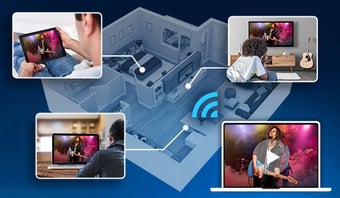
A key component of PowerDVD is the ability to wirelessly connect to any device to easily access entertainment possibilities. People can stream content to their TVs through their devices, which allows for a seamless media experience. Use Apple TV, PC, and mobile devices to initiate the feature.
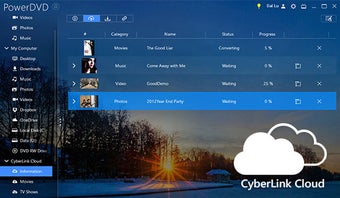
The PowerPlayer enables users to consume content on the go. The tool can initiate media listening and viewing opportunities through connections to the cloud storage and within devices; people can select a source location to consume the content.
This service allows the community to store media beyond an external hard drive. Access files anywhere and with any device, including smartphones with the free Power Media Player application.
With the TrueTheater video and audio quality inclusion, people can encounter playback enhancements while watching media: 1080P full HD, 4K Video Ultra HD, and 8K Video Ultra HD. TrueTheater includes the capability to play HDR on any TV, and Blu-ray playback options.
How do I play a DVD on PowerDVD?
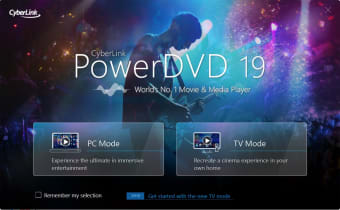
Upon opening PowerDVD, consumers can choose which interface they would prefer to use: PC or TV Mode. PC Mode is suitable for computers, and TV Mode is designed especially for use on televisions. Within the PC mode user interface, the community can navigate through the program’s sections within the left panel.
Browse through the Media Library which houses users’ media information, and the ability to play a DVD. Underneath the Media Library tab is My Computer; in this tab, search for media within the device. To organize media, locate Playlists. People can create playlists by dragging and dropping their media into groups. My Shared Media and CyberLink Cloud allow wireless connections to devices.
CyberLink includes accessibility to YouTube and Vimeo within the Online Video tab. The community can connect to these websites to watch their selected content through the software’s interface. PowerDVD enables consumption of media in up to 8K resolution with visual and audio enhancements. Hover above a video and select the pin button to save the video in the pinned list for offline viewing purposes.
How do you use PowerDVD?
While watching videos, the TrueTheater feature is accessible as the eye icon on the bottom of the user interface: Video Enhancements. Upon clicking on the icon, users are greeted by a pop-up window with two tabs: Smart and Advanced Enhancement. Within the Smart Enhancement tab, people allow the technology to augment the audio and video qualities by optimizing color, sharpening detail, amplifying sound, etc.
Within the Advanced Enhancement option, people can tailor the video and audio settings to their preferences: HD, noise reduction, etc. There are also different display modes at the bottom of the pop-up window.
Users can alter the qualities, subtitles, and take a snapshot of the piece by clicking on the star within a box icon on the bottom bar. Backward, stop, play, forward, volume, zoom and full-screen buttons are accessible while the clip is playing.
By navigating to the right of the icon bar, the community can access the Share tool. Distribute and save the media on YouTube, Vimeo, or within the CyberLink Cloud.
With compatible 3D devices, glasses, and the CyberLink PowerDVD software, the TrueTheater constituent can convert 2D pieces into 3D masterpieces. Additionally, the multimedia player can transform 2D content into virtual realities with 360-degree technology.
Connect the software to a VR headset to engage in the virtual realm through a myriad of options: right-clicking on the preferential video to choose Play to and then VR Headset. The virtual interaction with the headset can be utilized while navigating the CyberLink user interface.
Is CyberLink PowerDVD safe?
CyberLink PowerDVD Ultra is safe. Given that the platform is not open source, the program is only derived from the creators. If there are questions regarding the multimedia suite, then people can contact the support center. While PowerDVD is secure, CyberLink creates other applications that are questionable in terms of their safety: FaceMe is a facial recognition program designed for smart surveillance.
CyberLink creates an array of software programs: PowerDirector, PhotoDirector, YouCam, PerfectCam, etc. These platforms all correspond to heightening the viewing experience by enhancing the audio and visuals.
The latest version delivers a premium viewing experience with stunning 4K Ultra HD and 8K playback, supported by advanced Video Super Resolution and ultra-smooth Frame Interpolation. It enhances Blu-ray and DVD playback for a true cinema-like feel and introduces Instant Karaoke, removing vocals from local files or YouTube. TrueTheater Color, Lighting, HDR, and Audio automatically optimize playback based on your display for richer visuals and sound.
Alternative media players
Windows Media Player, VLC Media Player, and Corel WinDVD are other software that can play content. VLC Media Player is a free and open-source alternative to the other proprietary platforms. Windows Media Player can be considered as freeware, although people need to first purchase the Windows operating system.
CyberLink PowerDVD and Windows Media Player include user-friendly playlist capabilities. PowerDVD, WMP, and WinDVD are only available on Microsoft Windows OS; while VLC is a cross-platform software operating on Microsoft, Apple, Linux, Android, and Chrome devices: PC, Windows phone, Mac, iOS devices, Apple TV, etc.
Ultimate media enhancer and player
CyberLink PowerDVD Ultra takes content and improves the audio and visuals. The program focuses on enhancing, converting, and sharing images and sounds to heighten the entertainment experience. Advance files’ with TrueTheater by editing the lighting, color, sound, etc. Easily circulate pieces of media within a network by accessing the cloud or sharing features: YouTube and Vimeo.